
Free, with fair ads
Ads show only between deals, never during a hand. Watch one ad for 30 minutes without any.
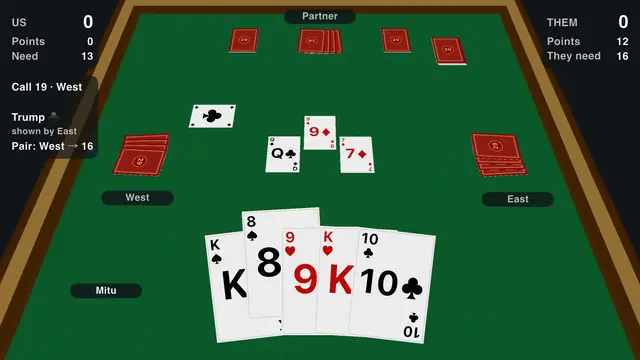
Download the free Twenty-Nine card game for your Android phone or tablet. Play offline against bots, or start a local Wi-Fi match with friends. Includes Bangladeshi rules, a 3D table, and English and Bangla menus.
Ads show only between deals, never during a hand. Watch one ad for 30 minutes without any.
Easy, Normal and Hard bots run on your phone. After installation, offline matches need no internet connection.
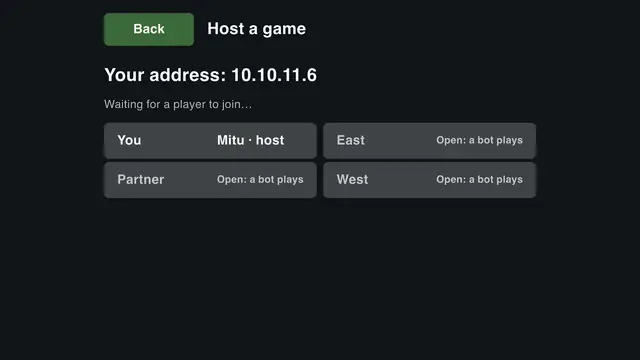
Host or join a game for 2 to 4 players on the same Wi-Fi, with phones and Windows PCs together.
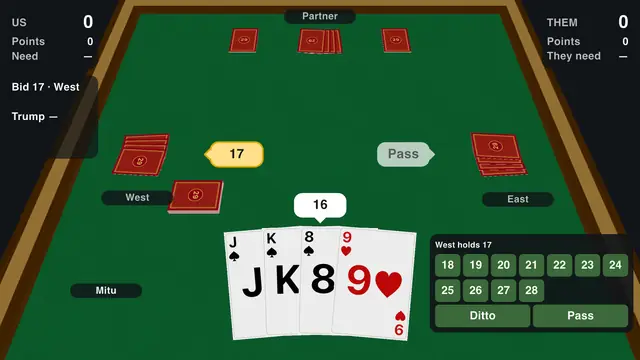
Bidding with Ditto, the hidden trump, Show Trump, the Pair, Double and Redouble, or your own house rules.
The whole game, its tutorial and its rulebook in both languages.
Leave in the middle of a match and pick it up later. Your stats are kept.
Prefer not to install anything? Play 29 in your phone's browser instead.
The Google Play listing shows compatibility for your device and the latest available update. You need an internet connection to download or update the app; a match against bots works offline after installation.
Open the installed Android app and start a game against bots. You play with a bot partner against two opponents. Choose Easy while learning, then try Normal or Hard. The tutorial explains bidding, choosing trump and taking tricks, and the built-in rulebook is available in English and Bangla.
Four players form two teams. The 32-card deck holds 28 points: Jacks are worth 3, Nines 2, and Aces and Tens 1 each. Your team bids for a target, then tries to win enough points to make the contract. See the complete Twenty-Nine rules for examples.
Android phones and Windows PCs can play together on the local network. Wi-Fi multiplayer is for devices on the same network; playing with distant friends over the internet is not available.
Need help connecting? Read the Wi-Fi setup and troubleshooting guide.
Switch the menus, tutorial and rulebook to বাংলা, with optional Bangla numerals. Choose the Bangladesh, Standard or Custom rules to match the way your group plays. বাংলায় অ্যান্ড্রয়েড ডাউনলোড গাইড পড়ো or learn টুয়েন্টি নাইন খেলার নিয়ম.
Twenty-Nine is the trick-taking card game of Bangladesh and eastern India: four players in two teams, 32 cards, a secret trump. Read the rules of 29 or the strategy tips, or see the FAQ.
Also available for: Windows PC · Linux · Web browser
Yes. The Android game is free on Google Play. It has ads between deals, never during a hand.
Yes. Once installed, the Android app plays offline against bots. Downloading and updating the app require internet access.
This site links to the official Google Play download. It does not provide a separate APK file. Use Google Play to install the app and receive updates.
Friends can play together over the same Wi-Fi network in the installed apps. Remote multiplayer over the internet is not available. The browser version lets you play against bots.
Open the Google Play listing on your Android device to check compatibility and the current app requirements before installing.
Made by a Bangladeshi developer, with the rules and the feel of home.